Planning Park-Wide Wi-Fi Across Metal-Shell Capsule Units
A capsule shell blocks radio signal, so one router per unit usually fails. How to plan between covered outdoor enclosures, wired backhaul and mesh links, and how to test the result.
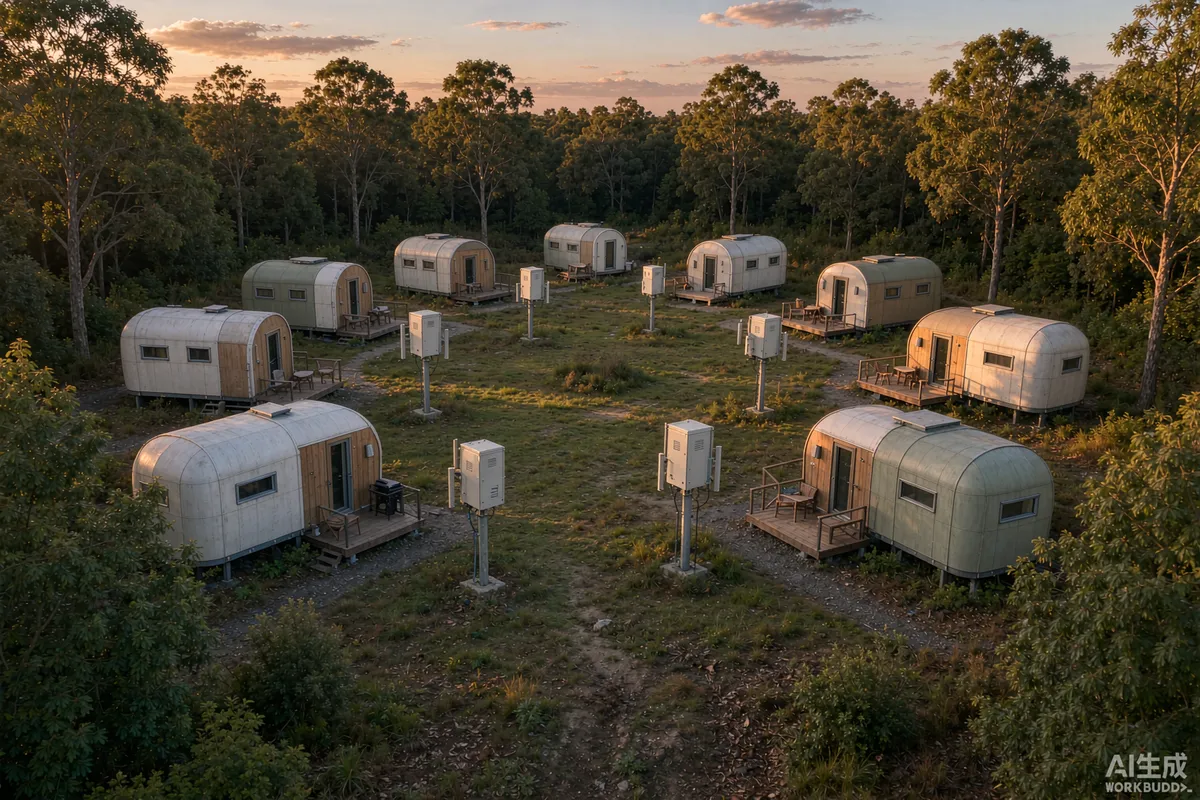
A single powerful router rarely covers a cluster of capsule homes, and adding boosters usually makes things worse rather than better. The reason is physical: a metal shell attenuates radio signal, so placing an access point inside one unit mostly serves that unit and leaks very little to its neighbours. Reliable park-wide coverage comes from treating it as an outdoor network problem first and an in-unit problem second - put the radio outside the shell, connect it with cable where you can, and test with the site occupied rather than empty.
Why Metal Units Break the Usual Assumption
Wi-Fi planning advice written for houses assumes signal passes reasonably well through walls. Capsule homes behave differently, and the difference explains most failed installations.
- The shell reflects and absorbs. An insulated metal-clad envelope attenuates badly compared with timber or plasterboard.
- Large glazing is not a way in. Modern coated glass designed to manage heat also reflects radio frequency energy.
- Each unit becomes its own coverage problem. Coverage stops at the shell rather than passing through it.
- Outdoor space matters as much as indoor. Decks are where guests sit, and they sit there with their devices.
- Occupancy changes everything. A survey taken in an empty unit with no people, no furniture and no neighbouring traffic flatters the result considerably.
Once you accept that each unit needs its own access point rather than sharing one, the remaining question is how those access points connect back to the internet.
Put the Radio Outside the Unit
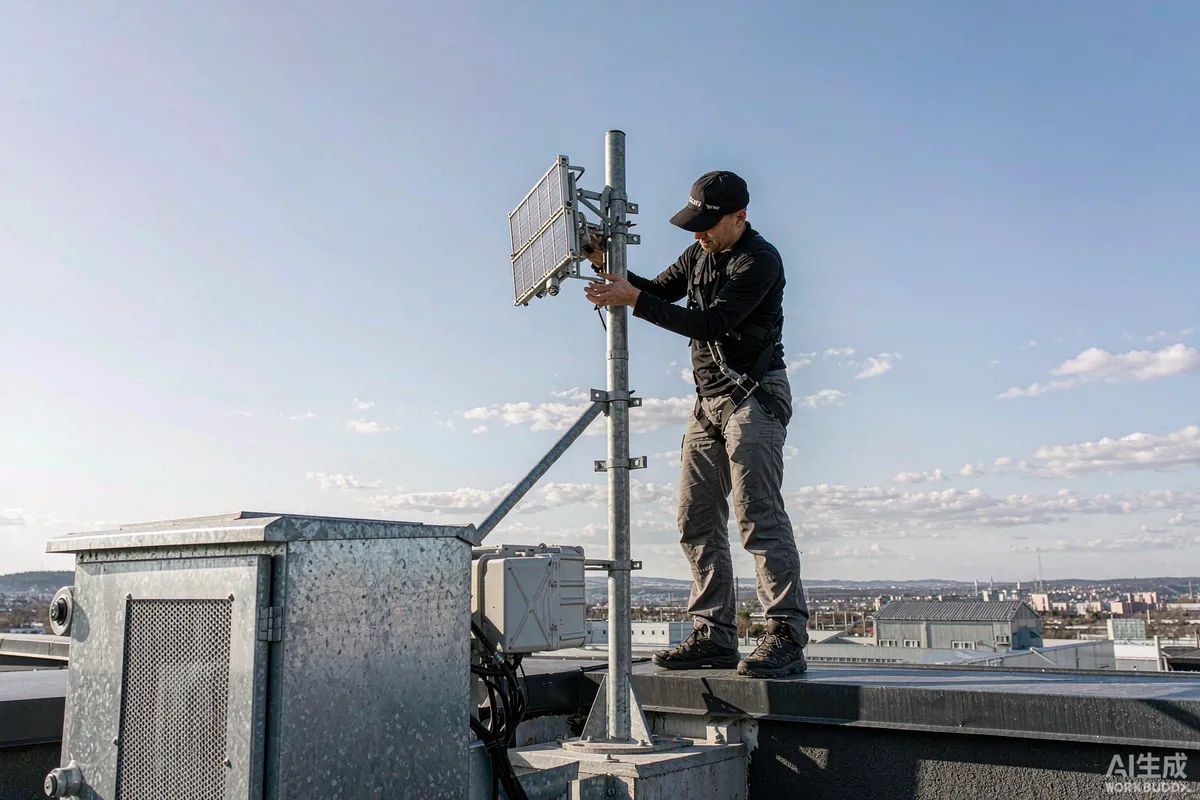
The single highest-impact decision is mounting location. An outdoor-rated enclosure with the access point inside it, mounted on the unit or on a nearby pole, serves both the interior and the deck far better than anything mounted indoors.
- Mount high and clear. A line that clears the unit's own structure, and ideally sightline toward the interior space it serves.
- Keep it out of the weather. An enclosure rated for outdoor use, with cable glands rather than loose cable through a hole.
- Avoid mounting directly on metal where possible. A short offset bracket reduces the metal immediately behind the antenna acting as a reflector.
- Plan the cable route before installation. Power and data need to reach the enclosure through the shell, which usually means deciding a penetration during fit-out.
- Label both ends. A cluster of identical enclosures is indistinguishable once commissioned.
Cable Where You Can, Mesh Where You Cannot
Backhaul - how each access point reaches the internet - determines most of the performance. Wireless hops are convenient and there is a real cost to that convenience.
| Approach | Strengths | Limitations |
|---|---|---|
| Copper cable to each unit | Full speed per unit, no interference, powers the device if supported | Trenching cost; needs planning before surfaces are finished |
| Fibre between buildings | Unaffected by electrical noise, future proof | Higher equipment cost, needs competent termination |
| Point-to-point wireless link | No trenching, crosses difficult ground, quick to add | Needs clear line of sight; weather and alignment affect it |
| Mesh hops between units | Fastest to deploy with no new cabling | Each hop roughly halves available throughput and adds latency |
The usual good answer is a hybrid: cable to a central point or to as many units as trenching justifies, and a single well-aligned point-to-point link for the units that are genuinely hard to reach. Reserve multi-hop mesh for cases where nothing else is practical, and always test whether the resulting speed supports what the listing promises.
Planning the Coverage Before You Buy Anything
A short survey prevents both under- and over-provisioning, and it does not need specialist equipment beyond a phone and patience.
- Walk the site with a signal app and record readings where guests will actually be - beds, sofa, deck, pathway.
- Test through the shell in both directions. Interior to exterior tells you how much an outdoor unit will help.
- Check cellular availability at each unit if any part of your plan depends on it, including failover.
- Note the terrain. Earth banks, dense planting and neighbouring buildings all change the picture seasonally.
- Identify your realistic internet source and its capacity before designing distribution for it.
The last point is decisive. A distribution network cannot deliver more than its source provides, and remote sites frequently have far less upstream capacity than the number of units implies.
Configuration Details That Matter
- Channel planning. Adjacent access points on the same channel interfere; separate them deliberately rather than leaving everything on automatic.
- Band steering. Devices that should use the closer-range higher band generally benefit from gentle encouragement rather than being forced.
- Transmit power. Turning everything to maximum is counterproductive; overlapping loud signals degrade each other. Moderate and even is usually better.
- Power considerations. Decide how each device is powered, and keep networking equipment on a circuit that stays live during a seasonal closure if you rely on remote monitoring.
- Guest network separation. Guest traffic should not reach management devices, cameras or controls.
- Written credentials. Record them somewhere accessible to whoever takes over the site, and change them when staff leave.
Testing Properly
- Test when busy. Full occupancy is when complaints occur and empty-site results do not transfer.
- Test what guests do. Video calls and streaming, not just a speed number.
- Test at the edges. The furthest unit, the far corner of its deck, and asleep at night with everyone streaming.
- Record baseline numbers so deterioration later is recognisable rather than arguable.
- Write down what you promised. If the listing says video calls work, that is the acceptance test.
Resilience: Planning for the Outage
A park that depends entirely on one internet path will eventually lose it, and guests generally discover during a work call. Decide in advance what the fallback is.
- Check cellular coverage at each unit rather than at the office, and test with the provider you intend to use.
- Keep the fallback simple. One documented switch that any staff member can operate beats an automatic system nobody understands.
- Say what the fallback can do. A cellular path may support messaging but not simultaneous streaming; tell guests honestly.
- Keep networking equipment on protected power so that it recovers cleanly rather than hanging after an outage.
- Document the whole arrangement - topology, credentials, who to call - and store it where it survives staff turnover.
Finally, keep expectations aligned with reality. A remote site rarely matches urban performance, and guests are generally reasonable when told the truth in advance. What produces bad reviews is a listing promising something the network cannot deliver, discovered at the moment it matters.
Phasing the Work
Networking is one of the few things worth over-specifying in the ground and under-specifying in the air, because cabling is expensive to revisit and radios are cheap to add later. A phased approach usually fits a park that is growing.
- Install conduit to every planned unit position even where a cable is not yet needed. Empty duct is inexpensive at construction and transformative later.
- Bring service to a central point first and confirm what the connection actually delivers before distributing it.
- Fit the outdoor enclosures and cabling during unit installation rather than afterwards, when the shell is already finished and sealed.
- Add access points unit by unit as occupancy grows, so spend tracks revenue instead of preceding it.
- Re-survey after each phase. Every new unit changes the interference picture for the ones already installed.
Keep a simple topology drawing - where the service enters, where each cable and link goes, what each device is - and update it whenever something changes. Two years in, that drawing is the difference between a fifteen-minute diagnosis and an afternoon of guesswork, particularly when the work was done by someone who has since moved on.
More from the Blog
Capsule Home Cost Guide: What You Really Pay in 2026
EXW, shipping, install and the hidden line items — a transparent breakdown of total landed cost.
Read article →
How to Install a Capsule Home in 3 Days: A Step-by-Step Guide
From site prep to first guest — the exact sequence our install crews follow on every deployment.
Read article →
Real Owners, Real Numbers: Success Stories
How a lakeside resort, a Spanish glamping site and a Singapore dealer hit their targets.
Read stories →Talk to the Factory
Ready to Ride the 2026 Wave?
Get the latest catalog, pricing tiers and a layout sketch for your land — straight from the engineering team.